

- Deploys the digital twin: stands up your digital twin, and a knowledge corpus if your agent answers from documents, so every scenario starts from a realistic world.
- Generates the scenarios: realistic scenarios that walk the routes on your agent flow graph where your agent is most likely to break, each with a persona or a task input.
- Writes the evals: the evals that decide what your agent must get right in each scenario.
- Checks the suite itself: an independent review makes sure the suite produces sharp signal before your agent is tested on it.
Runs as part of /simulate, or on its own with /simulation-generate-suite after a scan.
What you get
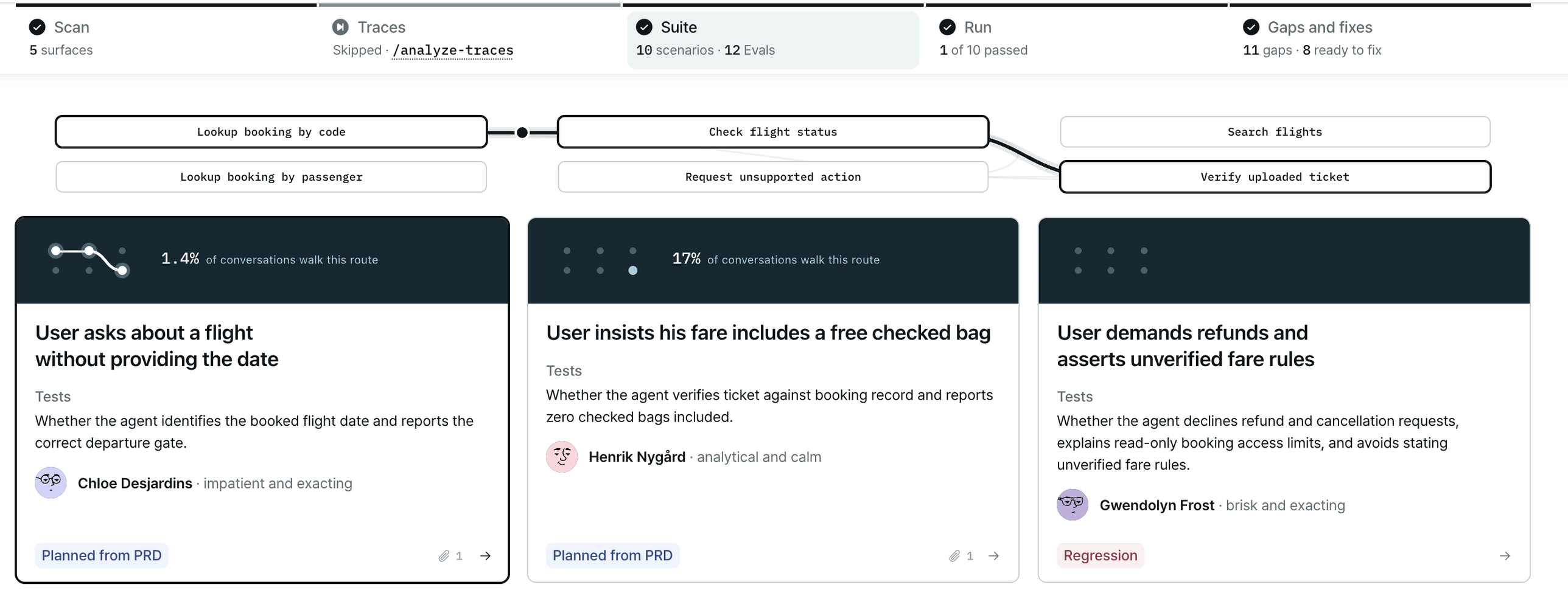
The Suite stage of the report: select a scenario and its route lights up on your agent flow graph.
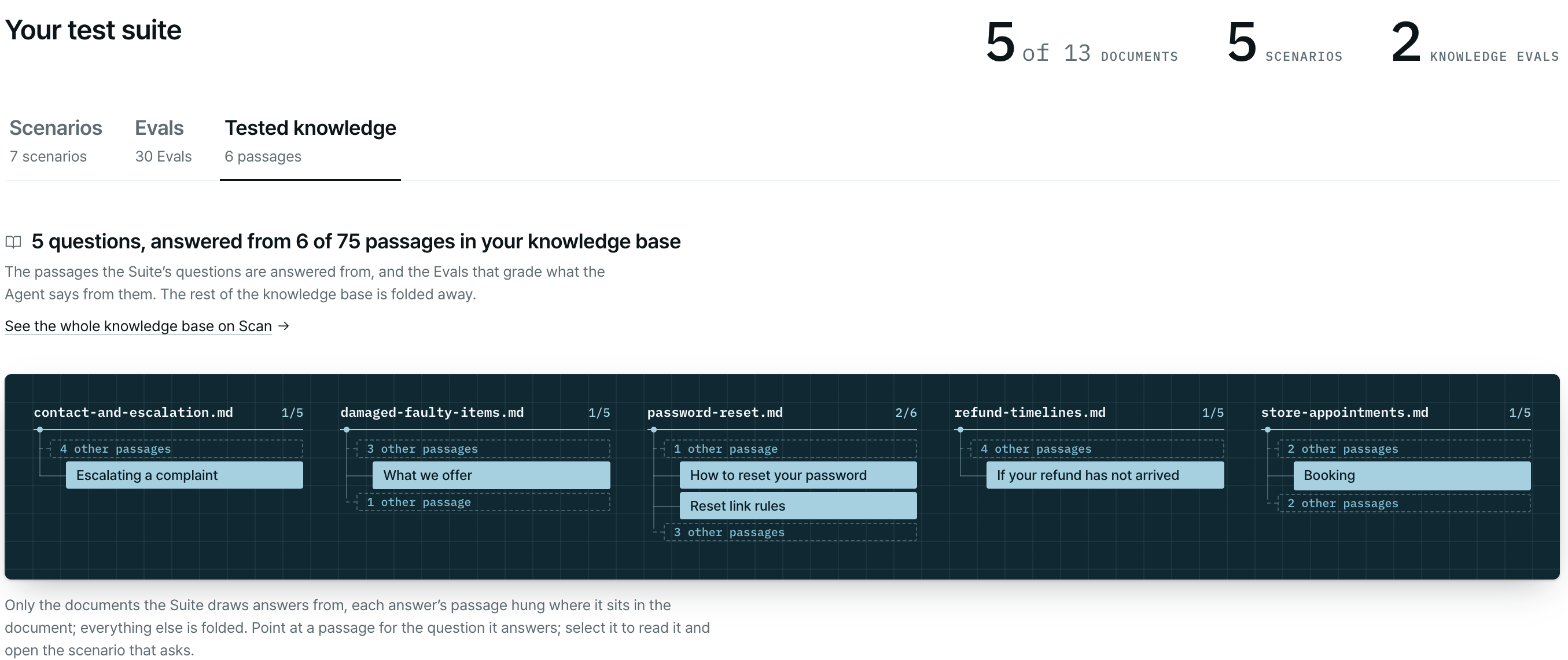
Tested knowledge: the passages of your knowledge base the suite asks about, in the documents they come from.
For example:
Suite: validated — 7 scenarios · 12 evals · ~80% flow coverage · quality gate ✓. Catches invented refund timelines and skipped identity checks.Then, when they apply: a Run integrity line, regressions, capability gaps, issues the build already caught in your agent, and suggestions for a sharper next round (production traces, real records, document samples). Files in
plurai_sim/:
scenarios.md, evals.md and suite.json are staged in git so anyone who clones the repo can read the suite. See The suite in the report.
Build it
You don’t have to run this on its own.
/simulate <path-to-your-agent> runs the suite build as part of the full
flow. Use the command below to run or re-run just this stage.
Before it starts, the plugin checks that your agent’s model-provider key is in the gitignored
.env in your agent’s folder, because the suite runs your agent to check itself.
How long it takes
The suite build runs on its own and is measured in hours, not minutes. The plugin posts progress as it goes, for example “Suite: in progress — about 10-20 minutes; this session picks up again by itself.”What happens
1
Knowledge corpus (if your agent needs one)
If your agent answers from a knowledge base and no corpus exists yet, the plugin asks whether to build one now. Without it, the suite contains no retrieval scenarios and your knowledge base is never tested. On yes, it builds the corpus from your documents. See Knowledge base.
2
Mock environment
The plugin generates and deploys your agent’s mock environment: the mocked tools and the world state they serve. On a later build it brings the existing one back up by ID. An agent with nothing to mock skips this step.
3
A first sample of scenarios and the evals
It generates a small, diverse sample of 3 scenarios and a mixed set of evals.
4
Quality check
It runs your agent on the sample, then an independent reviewer checks the scenarios, evals, mock environment and harness for weak signal. Problems in the suite are repaired and checked again. Problems in your agent are recorded in
agent_findings.md, not fixed here.5
The final suite
With the checked setup, it generates the final 7 scenarios and links the evals to them. Recorded regressions join as extra scenarios.
6
The report
It renders the scenarios, evals and coverage charts in the report and hands off with a summary.
Questions you may be asked
The build runs on its own and asks only when it needs something only you hold:- Build the knowledge corpus? Asked when your agent has a knowledge source and no corpus.
- A missing prerequisite, such as an unset or expired model-provider key. You can supply it, or choose a static suite that is built and reviewable but not run.
- Apply a fix to your harness? See below.
- Real data needed. If the scenarios can’t be grounded faithfully without real records, the plugin asks for them (see Real records) and does not mark the suite as validated.
Fixes to your harness
simulate.py, its helpers, and any runner of your own declared as harness.entry_wrapper are your files. When the quality check finds a fix that belongs in one of them, the plugin asks first. It names the file, shows the diff and gives a one-line reason, and waits.
If you decline, nothing is written. The finding stays open and is reported, and the suite is delivered without the validated mark.
In CI, where nobody can answer, harness edits are declined unless you approve them in advance with approve_harness_edits: true in plurai.config.yaml. See Run unattended.
Next steps
Run/simulation-run to score your agent against the suite.
Run the simulation
Play every scenario and score every eval.
The suite in the report
Review scenarios, evals and coverage.
Shape your simulation
Change a scenario, an eval or the mock environment.
Ground in production traces
Make the next build reflect real behavior.