

- Finds the root cause: traces each failure to its gap and the code that causes it, with quoted evidence and a confidence level.
- Proposes a fix: the smallest change that should close each gap, ranked in a fix plan.
- Leaves the changes to you: nothing in your code changes until you choose which fixes to apply.
- Keeps it from coming back: records a fixed gap as a regression, so the next suite catches it if it returns.
With /simulate: the flow ends here, with the fix plan: the root cause and a proposed fix for each gap. It applies nothing.
With /simulation-fixes on its own: it diagnoses your latest run, writes the plan, then lets you pick the fixes to apply and check them with —verify. Run it after every run with failures.
Apply the fixes /simulate found
/simulate ends with the fix plan in your report and in plurai_sim/artifacts/fixes.md. Your code is untouched. To apply the fixes:
1
Review the plan
Open the Gaps stage of your report. Each gap shows its root cause, where it broke and the proposed fix.
2
Pick the fixes and apply them
Choose one way:
- Run
/simulation-fixes. It picks up your latest run, asks which fixes you want, and applies each one as a diff you can review. - Ask in chat, for example “Apply the fixes for the refund gaps.” Your coding agent applies them from the plan.
- Apply them yourself from
fixes.md: each issue gives the file, the line and the proposed change.
3
Check that they held
Run
/simulation-fixes --verify. It re-runs the scenarios that exposed each fix and marks it fixed, still caught or not yet shown.What you get
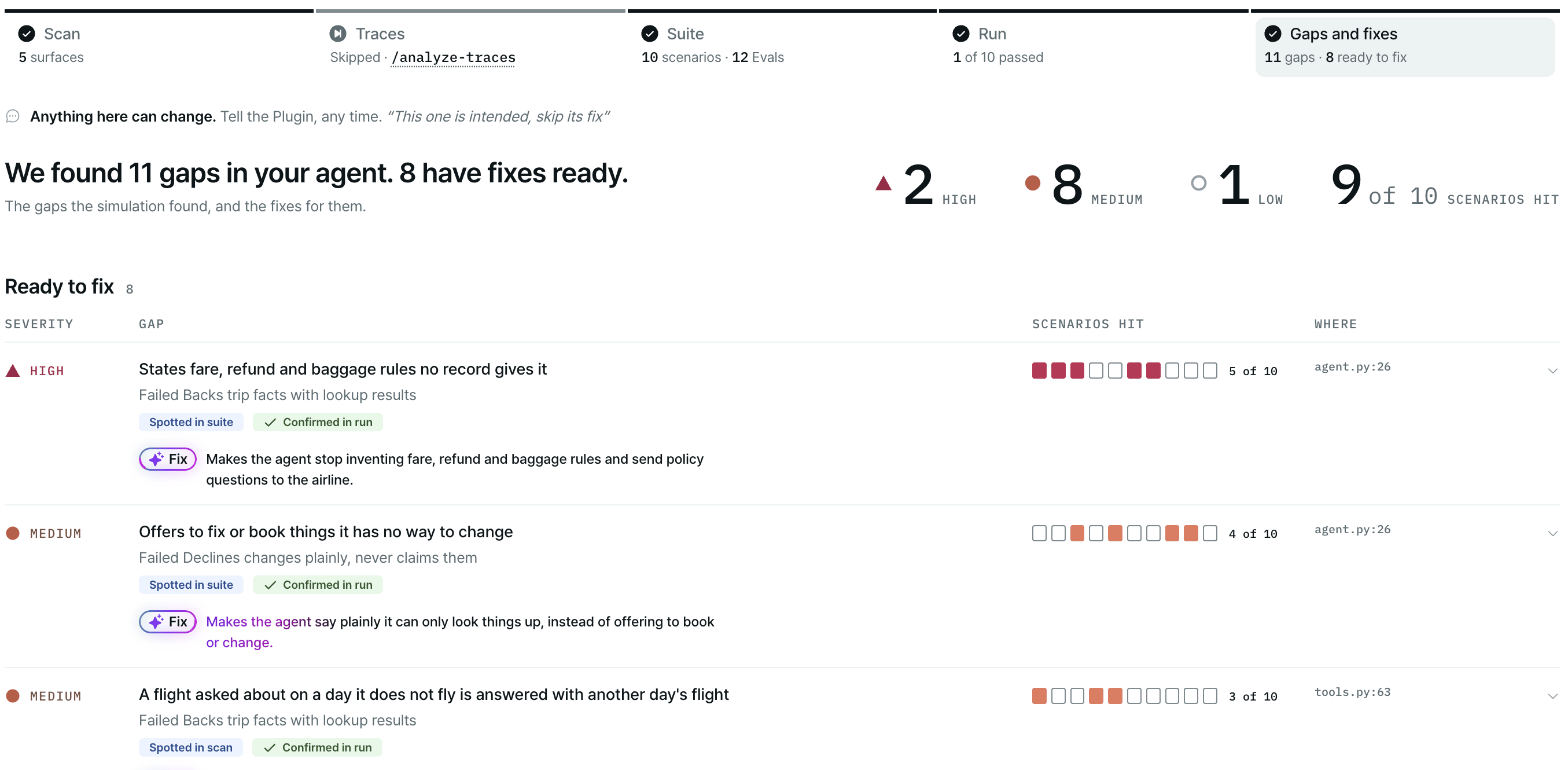
The Gaps stage of the report: every gap ranked by severity, with where it broke and its proposed fix.
Diagnosed 6 failures — 3 look like agent bugs, 2 test-setup, 1 mock-env. Also carrying 2 potential issues flagged while building, which may be intended. Open the fix plan →Each issue in
fixes.md has:
A final section lists the potential agent issues the scan and suite flagged that may be intended. They are not ranked.
fixes.md and agent_findings.md are staged in git so your team can read them. See Gaps and fixes for how they appear in the report.
Diagnose a run
If there is no run yet, run
/simulation-run first. You can also run /simulation-fixes straight after building the suite: it can work from issues the suite build already confirmed, with no new run.
What happens
1
The plugin reads the run
It reads each failing scenario’s transcript, tool calls, eval verdicts and errors, along with the issues already recorded in
artifacts/agent_findings.md.2
It finds where each failure comes from
Each failure gets one home:
- Agent bug: a real defect in your agent’s own code.
- Test setup: the harness, the configuration, a scenario’s seed, or an eval that is too strict.
- Mock environment: the seeded data or the mocked tools. These are fixed on the Plurai side during diagnosis.
3
It writes the fix plan
The plan ranks the issues and proposes the smallest reversible fix for each. It goes into
plurai_sim/artifacts/fixes.md and the report.4
You decide what to apply
Applying fixes is a separate step that you start. Nothing runs on its own, and you choose how involved you want to be:
- Ask the plugin to apply them: pick the fixes you want, or the whole plan, and each one is applied as a diff you can review.
- Work through it interactively: go fix by fix, and ask for a different approach in chat.
- Apply them yourself: use
fixes.mdas your guide, with the file, line and proposed change for each issue.
/simulation-fixes --verify.Check your fixes
--verify runs the scenario set again into a new run folder and checks each accepted fix over several trials on the scenarios that exposed it. Each fix is marked fixed, still caught or not yet shown, and fixes.md gets a column with the result. To save time you can verify only the failing scenarios; the plugin then says the rest were not checked.
Nothing is called fixed until it is verified.
Keep a gap as a regression
When you accept a fix for an agent bug, the plugin records the gap as a regression before it applies the edit. You don’t need to do anything. To record one by hand:What a regression is
A regression is a folder underplurai_sim/regressions/ that replays the conversation that exposed the gap, cut just before the turn where your agent went wrong:
regressions/ folder is meant to be committed.
How the suite uses it
A regression joins your scenario set at the next/simulation-generate-suite, as one extra scenario in the final batch. After that, every run replays it several times. Until then, --verify checks the fix through the original scenario, and /simulation-run warns you when a recorded regression is not yet in the set.
Regressions stay after the gap is fixed. To retire one, delete its folder.
When a regression is not recorded
The plugin does not record a regression when:- The issue is only a potential issue that no run confirmed.
- The issue’s home is not your agent.
- A test-setup or mock-environment issue touches the same scenario. Fix that first, run again, and record from the clean run.
- A folder for that issue already exists.
- The installed SDK is too old. Update it and run
/record-regressionagain.
Next steps
Replay from where it broke
Turn real production failures into scenarios for your next cycle.
Gaps and fixes
The fix plan in the report.
Build the suite
Rebuild the suite so it carries your regressions.
Shape your simulation
Change scenarios, evals or the mock environment.
Concepts
Gaps, regressions and the rest of the vocabulary.