

#run) and fills in while the Run plays.
The simulation run: how each scenario played out, scored by the Evals.
The headline
The top of the section reads, for example, 5 of 7 scenarios passed, with how many times each scenario was played (plays per scenario). The final Run plays every scenario 3 times, as 3 independent attempts. A verify Run after fixes, and the Runs inside the suite build, play each scenario once.Pick a Run
When the project has more than one Run, a switcher picks which one the section shows:The attempt grid
An Attempt is one playthrough of a scenario: one conversation, one square.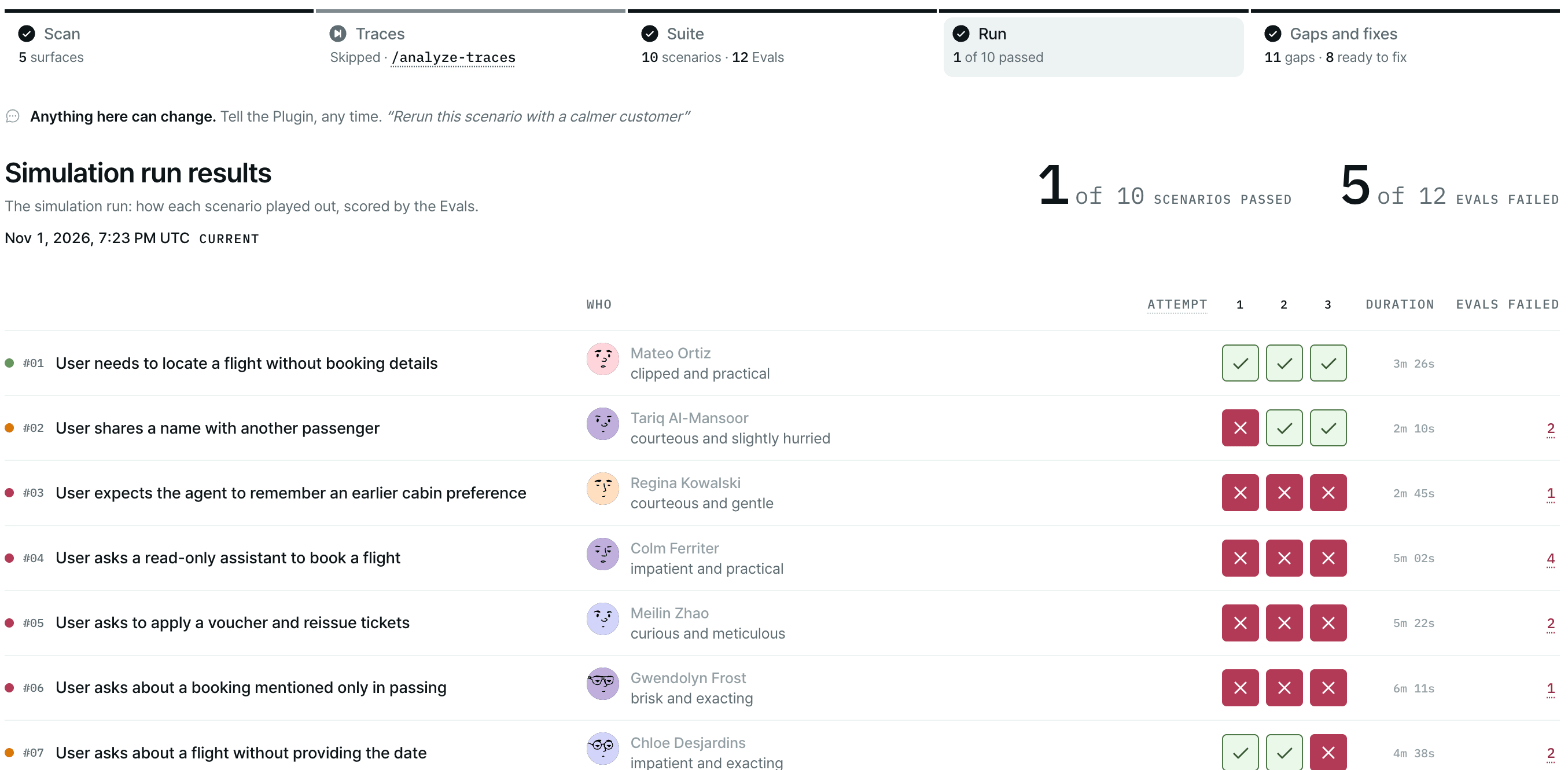
The attempt grid: every scenario played three times, with the evals that failed.
If the Run stops early, the grid says The Run stopped here. Finished conversations keep their square;
the rest never played. The summary under the grid counts what didn’t count, for example
21 conversations, 1 withdrawn, 2 lost.
Consistency
With more than one attempt per scenario, each scenario gets a consistency label:Evals
The Evals table below the grid scores each eval across the Run.
The header reads, for example, 21 conversations, each scenario played 3 times · 2 Evals failed at least
once. Evals that never failed are folded: use Show N Evals that never failed to list them. The table
also notes evals that applied to no conversation, and evals that reached no verdict, in this Run.
The conversation drawer
Select a square, a failing eval row or a gap’s scenario to open the conversation. It opens at the turn where the conversation broke. Link to it with#run.drawer-<scenario id>.run-<run folder>.attempt-<n>.turn-<n>.
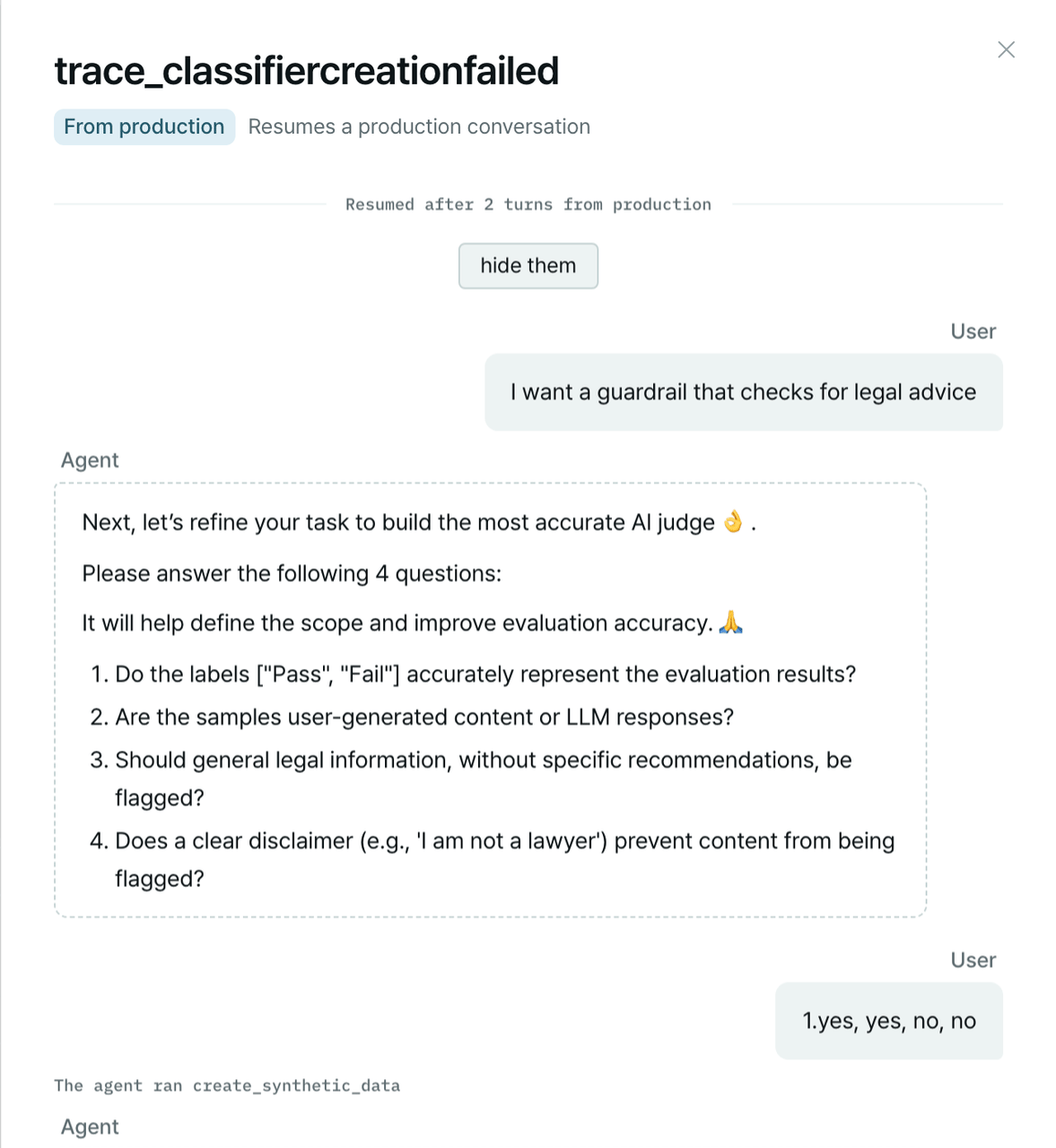
The conversation drawer: the full conversation, with every tool your agent ran.
The header
The header shows the attempt’s outcome, its consistency label and the tally, for example Failed · Attempt 2 · Inconsistent · 1 of 3 attempts passed. A scenario played once reads Played once. Switch attempts at the top. Back to the first failing attempt returns to the first attempt that failed.What broke
What broke lists each eval this attempt failed, with the turn it failed on and the gap it belongs to, if any, with that gap’s severity. Select the gap to open it in Gaps and fixes. When nothing failed, it says No Eval failed on this attempt.The conversation
Each turn shows the User (the simulated user) and the Agent. Failed turns are marked, for exampleturn 4 · failed. Turns without failures are folded: use show N turns without failures to read them.
For each failure in a turn:
Tool calls appear inline as The agent ran
<tool>, with its arguments and Output of <tool>.
Each call says who answered it: served by the twin (the mock environment) or your system. A call
that errored shows failed.
The agent’s own actions show as events: Handed the conversation off, Conversation closed by the
agent, or Waiting for the user’s decision.
Ended early
A conversation that stopped before its natural end says why:Run integrity
Some facts change how the numbers must be read: trials that could not run on our side, scenarios cut by the time budget, or a flow removed because it can’t finish within that budget. When one applies, the Run’s chat summary carries one Run integrity line, for example:Next steps
Gaps and fixes
The failures grouped into gaps, worst first, with a proposed fix for each.
Run the simulation
Run the suite and read the summary in chat.