

- Tool traffic: how often each tool is called and what it returns, so your digital twin behaves like your real systems.
- Anomalies: the odd responses, edge cases and noise your agent really meets.
- Speaking style, for a conversational agent: how your users actually write, so simulated users (personas) sound like them.
- Failures: what goes wrong in production, so evals target it and real failures become scenarios.
Optional. /simulate asks whether to connect traces, or run /analyze-traces on its own. Best done before you build the suite, so everything is generated grounded.
What you get
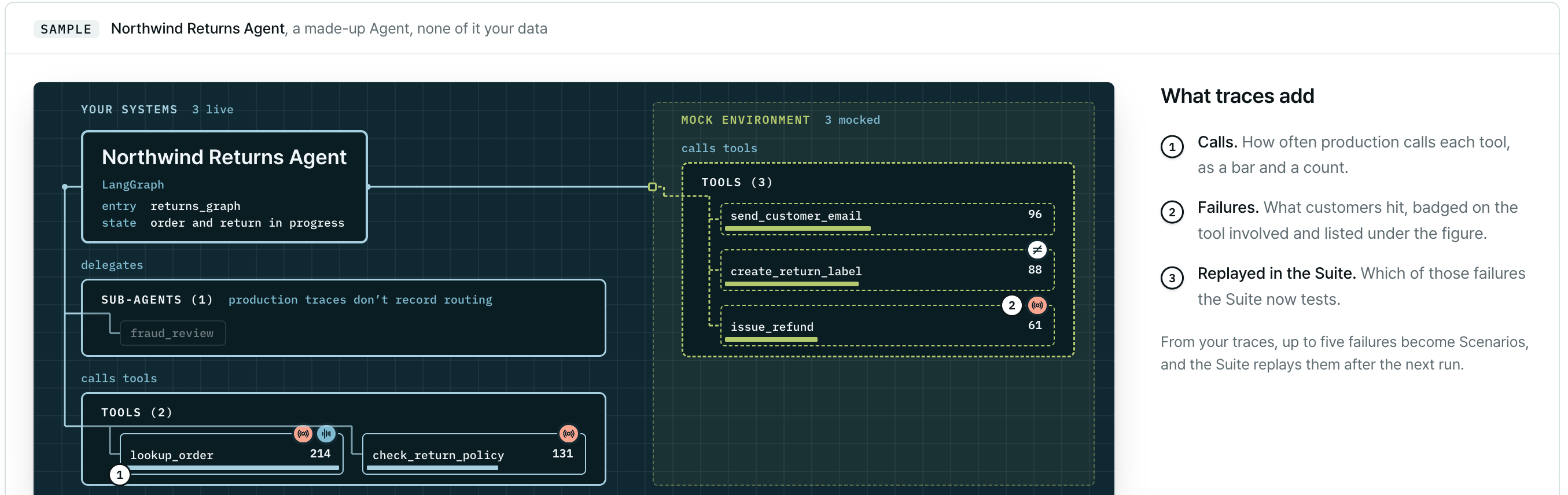
The Traces stage of the report, shown on a sample agent: how often production calls each tool, the failures customers hit, and which ones the Suite now replays.
Choose your path
Analyze production traces
You don’t have to run this on its own.
/simulate <path-to-your-agent> asks whether to connect a trace source as part of the full flow, and
grounds the suite if you do. Use the command below to run or re-run just this stage.
Trace analysis reads LangSmith and Langfuse directly. Arize spans can be replayed (see Replay production conversations), and every Run can be recorded to LangSmith, Langfuse, Arize or Braintrust. See Observability platforms.
You need the platform’s client installed (
pip install langsmith or pip install langfuse) and its credentials. The plugin reads them from the environment (LANGSMITH_API_KEY, or LANGFUSE_PUBLIC_KEY and LANGFUSE_SECRET_KEY with optional LANGFUSE_HOST) or asks for them. Credentials stay on your machine: they are never written under plurai_sim/ and never uploaded.
Trace export uses
LANGSMITH_API_KEY (one underscore). Recording a run to LangSmith uses LANGSMITH__API_KEY (two underscores) in your agent’s .env. See Run the simulation.1
You say which traces matter
The plugin asks once for the platform, the project and, optionally, which conversations matter, such as “only failed runs”, “only runs tagged X”, or a list of conversation IDs. Narrowing is available on LangSmith; Langfuse takes the most recent traces.
2
Traces are exported locally, then uploaded
The SDK exports the traces on your machine into
plurai_sim/traces/ and uploads them as one archive. If this is your first upload, the plugin asks whether to anonymize first.3
The backend writes the trace brief
The Plurai backend reads every trace and writes a brief covering your agent’s capabilities, anomalies, how your users talk, the failures to evaluate, and scenarios worth testing. This takes from a few minutes to 40 or more.
4
You choose what to apply it to
Parts of the suite you haven’t built yet are generated grounded. For parts that already exist (mock environment, scenarios, evals), you choose which to update.
plurai_sim/artifacts/trace_brief/. Failures found in the traces become trace scenarios under plurai_sim/trace_scenarios/, each resuming the real conversation at the turn where it broke. They join the suite at the next /simulation-generate-suite. See Replay production conversations.
Continue real conversations
/trace-to-scenarios turns conversation exports on disk into scenarios that resume: your agent starts with the real transcript and state already restored, and the simulated user continues from where the real one stopped. Use it for stalled threads, follow-ups after an escalation, and other moments you want to test exactly.
- One export becomes one scenario. Pick a focused 10–30 conversations rather than hundreds.
- Conversion runs locally in SDK code. No model reads the conversation.
- It reads LangSmith thread exports from LangGraph agents (the default) and OpenInference span trees (
--source-format openinference). For anything else, author an adapter first. - Your harness needs a
seed_statethat can restore a conversation. The plugin checks this and updatessimulate.pyif needed. - It works only with
anonymize: false. Under an anonymized posture it refuses, with no fallback.
/simulation-generate-suite to generate the scenarios.
Teach the converter a new format
plurai_sim/plurai_adapters/<format>.yaml. Commit it like plurai.config.yaml; every later conversion reuses it with no model involved. Then pass the format name to /trace-to-scenarios. Nothing is uploaded at this step.
Nested span exports other than OpenInference (for example Langfuse trace exports or OpenTelemetry GenAI spans) are refused by name.
Not sure which lane
/ground-scenarios asks what you have, Conversations to continue, Records to start from, Both kinds of material or Unsure, and routes you to /trace-to-scenarios, to /upload-scenario-bundle (see Real records), or to both as one set. It never generates scenarios itself; run /simulation-generate-suite afterwards.
What gets uploaded
Each upload is one archive, sent over your connection to the Plurai backend after you approve the command. Your platform credentials are never uploaded. Every upload is recorded in.plurai/uploads/audit.log with its posture. For anonymization, retention and deletion, see Data and privacy.
Next steps
Build the suite
Generate the grounded mock environment, scenarios and evals.
Observability platforms
Connect LangSmith, Langfuse, Arize or Braintrust.
Real records
Ground scenarios in real records and documents.
Data and privacy
What leaves your machine and how to anonymize it.