

- Restores the real conversation: your agent starts with the real transcript and state from your traces, word for word.
- Picks up at the failing turn: the conversation is cut just before the turn that failed, and a simulated user continues from there.
- Reproduces the failure: across several attempts, so you see whether your agent fails at the same turn.
- Feeds the fix loop: the failure is diagnosed to the code that causes it, fixed, and kept as a regression.
After your first cycle. Once you’ve run the simulation and worked through the fixes, replay real production failures with /analyze-traces or /trace-to-scenarios. They join your suite at the next build.
What you get
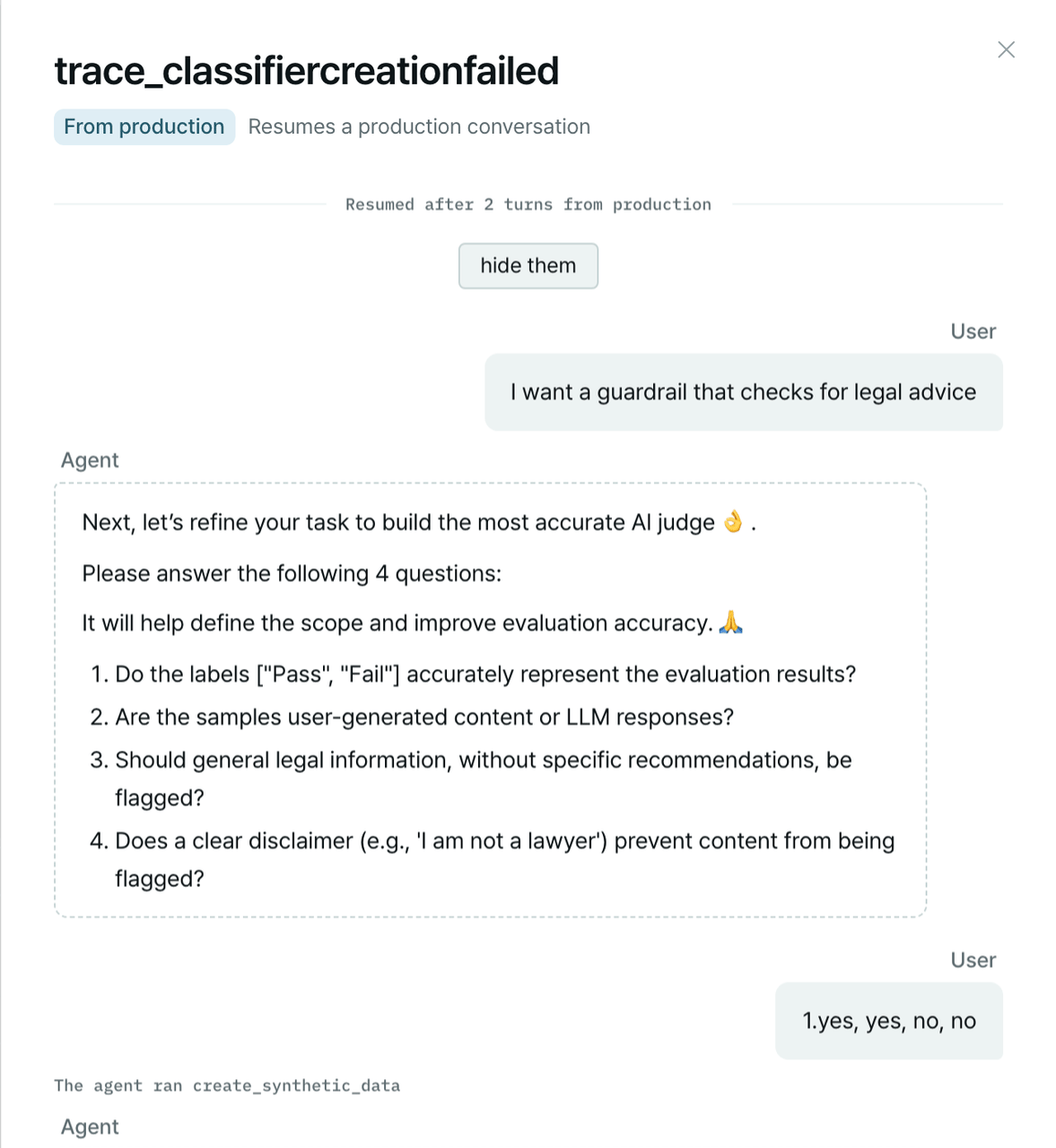
A replayed production conversation in the report: the real turns are restored, and the simulated user picks up after them.
- Traces: Production traces lists the failures found in your traces and how many are replayed in the Suite, with a link to each replay scenario. See Suite and Traces.
- Suite: a replay scenario carries the provenance Replays a production failure.
- Run: a replay that could not play to its end shows Ended early: the replay was cut short. See Run results.
- Gaps: the gap links to the conversation and the turn where it broke, and its fix. See Gaps and fixes.
How replay works
1
The conversation comes from your observability platform
The plugin exports traces from LangSmith or Langfuse with
/analyze-traces, or you point it at an export
you already have on disk, such as a LangSmith thread export or Arize OpenInference spans. See
Supported sources.2
It is converted on your machine
The SDK’s converter (
plurai convert-trace) turns each conversation into a resume pin: the transcript
and the agent’s state up to the cut. The conversion is deterministic code. No model reads or rewrites
the conversation, so the replay is the real conversation, word for word.3
The cut is chosen at the failing turn
When the conversation comes from a failure in your trace brief, the plugin reads the numbered transcript
and cuts just before the user turn whose agent reply shows the failure. When you convert exports
yourself, the conversation resumes from its end, or from the turn you name.
4
It becomes a resumed scenario
The pin is uploaded as a scenario bundle, and the suite build turns it into a scenario that resumes
rather than starting a new conversation. In the report it carries the provenance
Replays a production failure.
5
Your harness restores the conversation
At the start of the scenario, the harness’s
seed_state hook replays the pinned transcript into your
agent’s own history. The plugin checks that simulate.py can do this and updates it if needed. See
Write a harness.6
The simulated user takes it from there
The persona picks up where the real user stopped, every eval scores the conversation, and the run shows
whether your agent fails at the same turn, across several attempts.
Replay the failures in your traces
The fastest path is to let the trace analysis find the failures for you:plurai_sim/trace_scenarios/, each cut at the failing turn, and keeps up to
10 on disk. They join your suite at the next /simulation-generate-suite.
To pick a failure and a cut yourself, name them:
K is the user turn whose agent reply shows the failure.
Replay conversations you choose
When you already know which conversations matter, for example stalled threads or follow-ups after an escalation, export them and run:- One conversation becomes one scenario. Pick a focused 10–30 conversations rather than hundreds.
- The plugin locates the exports and converts them. It never opens the raw files itself.
- A format the converter doesn’t know needs an adapter first: run
/author-trace-adapter, then pass the adapter’s name to/trace-to-scenarios. See Teach the converter a new format.
/simulation-generate-suite to generate the scenarios.
Supported sources
From replay to fix
A replayed failure goes through the same Fix stage as any other:1
Run the suite
/simulation-run plays every scenario, replays included, in several attempts. The run results show
whether the failure reproduces consistently.2
Diagnose and fix
/simulation-fixes traces the failure to the code that causes it, quotes the turn as evidence, and
proposes the smallest fix. You choose which fixes to apply. See
Fix gaps and keep regressions.3
Verify
/simulation-fixes --verify runs the suite again, so you see the same conversation pass from the same
turn.4
Keep it as a regression
An accepted fix keeps the gap as a regression: a scenario that replays that turn in every later suite, so
the failure is caught if it ever comes back.
Limits
- Raw data only, for now. Replay refuses under the anonymized posture, with no fallback. Production conversations are replayed verbatim. See Data and privacy.
- Review before you commit. Replay scenarios hold production conversations word for word. They are staged in git, not committed.
- Replays skip the suite’s coverage walk. They test exactly the conversations you chose. Broad flow coverage still comes from the rest of the suite.
Next steps
Observability platforms
Connect LangSmith, Langfuse, Arize or Braintrust.
Ground in production traces
Build the trace brief that finds the failures to replay.
Fix gaps and keep regressions
The Fix stage in detail.
Write a harness
How
seed_state restores a conversation.