

- Records into your observability tool: every scenario lands as a trace, with its eval scores.
- Plays every scenario on your digital twin: a simulated user plays each persona in a conversation, and a task or workflow agent gets the scenario’s input.
- Repeats each one three times: to separate consistent failures from flaky ones.
- Scores every eval: on every conversation or result.
- Shows the evidence: the conversation, your agent’s steps and every tool call.
 LangSmith
 Langfuse
 Arize
 Braintrust
Runs as part of /simulate, or on its own with /simulation-run. Re-run it after every change to your agent.
What you get
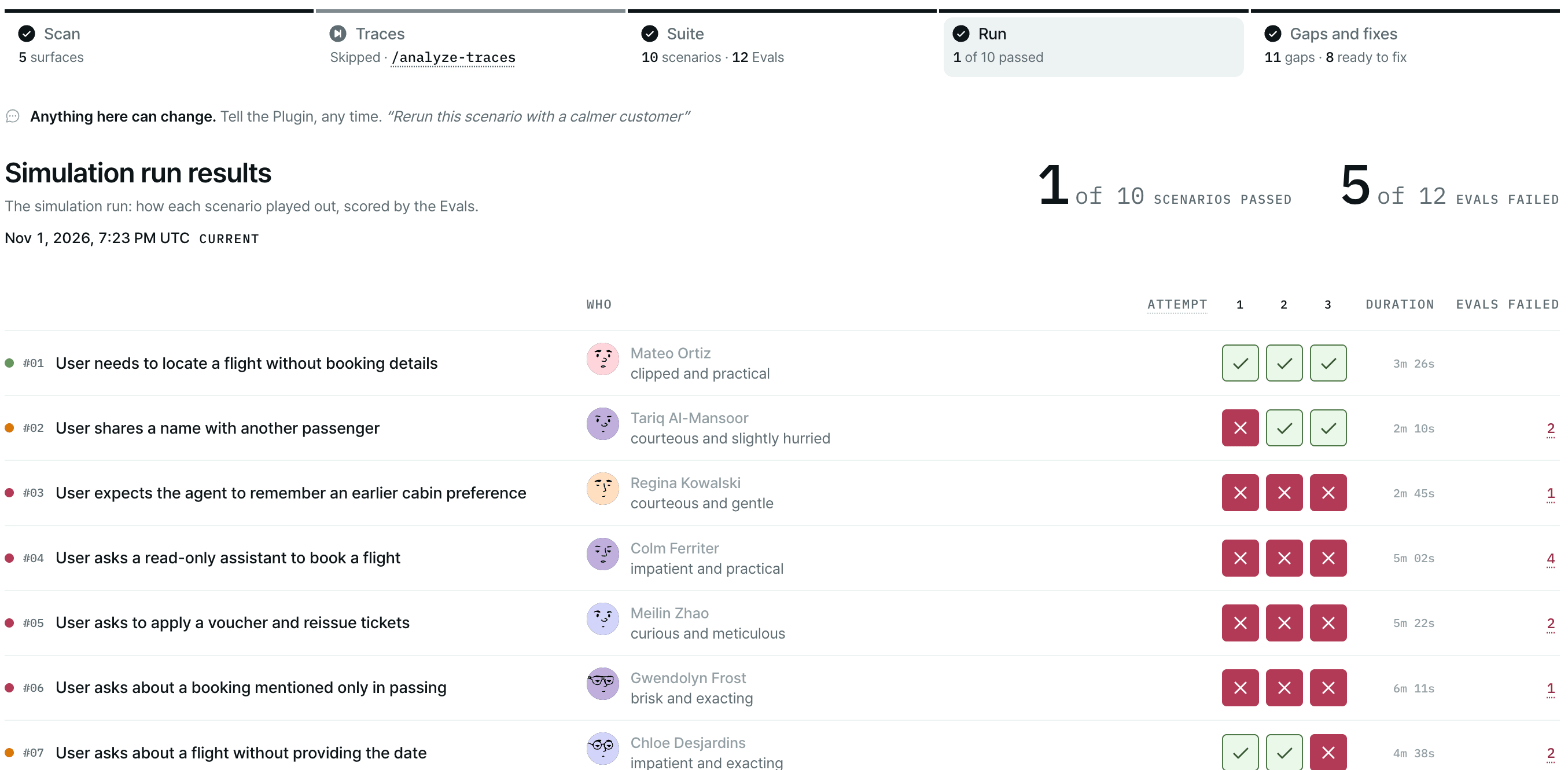
The Run stage of the report: every scenario played three times, with the evals that failed.
You see all of it in the report, and in your own observability tool if you connect one (see below).
The chat summary looks like this:
Run complete — 7 scenarios (3 trials each): ✅ 15 of 21 trials passed · ❌ 4 of 21 failed a critical check · ⚠ 2 of 21 failed a high-severity check.It continues with what failed (in your domain’s language, with scenario IDs), the run integrity line if any, and where the results are.
Run folders are gitignored. The run’s saved artifacts are also uploaded to the Plurai backend so failures can be attributed. See Data and privacy.
Start a run
You don’t have to run this on its own.
/simulate <path-to-your-agent> runs the run as part of the full
flow. Use the command below to run or re-run just this stage.Before it starts
The run checks its prerequisites before it spends anything:- A finished suite. If
/simulation-generate-suitedid not complete, run it first. - A live mock environment. If it has lapsed, the plugin redeploys it by ID. Agents with nothing to mock skip this.
- Your agent’s model-provider key (for example
OPENAI_API_KEYorANTHROPIC_API_KEY) in the gitignored.envfile in your agent’s folder. An exported key does not reach the run.
policies_config.yaml by hand changes nothing; to change an eval, say so in chat. See Shape your simulation.
Record it in your observability platform
Plurai works with the observability tool you already use: LangSmith, Langfuse, Arize or Braintrust. Connect one, and each simulated scenario is recorded there just like a production trace: the conversation, every agent step and tool call, and the eval scores attached as feedback. You can debug a simulated failure with the same tools and views you use for real ones, and compare runs over time.LangSmithLangfuseArizeBraintrust/simulation-run yourself, the plugin asks:
Record this run in your observability platform?LangSmith, Langfuse, Arize and Braintrust are supported, one at a time. If a key is missing, the plugin asks for it. Put it in your agent folder’s
- As a tracked experiment (recommended) — one record per scenario, eval scores attached as typed feedback, comparable across runs.
- Just traces — emit the per-scenario traces without the dataset-backed experiment grouping.
- No observability — run and score locally only.
.env:
What happens in a run
1
Each scenario starts in your sandbox
Your agent runs on your machine, with its real components. Every call it makes to a mocked system goes to
your private sandbox in Plurai’s cloud, where the scenario starts from its own seeded world.
2
The simulated user plays each scenario
For a conversational agent, the simulated user is a user agent we provide. It plays the scenario’s persona,
opens with its first line and pursues its goal over several turns. It sees only what a real user would see,
and can give up when the goal is unreachable or push back on the agent’s closing turn. A task or workflow
agent instead receives the scenario’s input and returns a result.
3
Each scenario runs three times
A run plays each scenario in 3 independent attempts (trials), so you can tell a reliable failure from an intermittent one. Recorded regressions are replayed 5 times each.
4
Every eval is scored
Each conversation is scored against every eval in the suite.
5
Results are written and the report updates
You get a summary in chat and the report updates with the run’s results.
Why a conversation ended early
When a conversation ends before its plan finishes, the report shows the reason:
You may see other reasons. They are shown as reported.
Run integrity
If the run could not measure everything it set out to, the results carry a Run integrity line. It appears only when something applies, for example:Run integrity — 1 scenario landed incomplete on the 40-minute scenario time budget; it was graded to the turn it reached and counts as neither a pass nor a fail.Other cases are trials that could not run on Plurai’s side, trials stopped by your model provider, and trials where your agent’s process could not start. Each tells you whether to run them again. A green run with an integrity line is not a full measurement. An agent that raises an error inside its turn counts as a failure, not as “could not run.”
Next steps
If anything failed, run/simulation-fixes. It diagnoses each failure in your agent and hands you a ranked fix plan.
Fix and keep regressions
Turn failures into fixes and replayable regressions.
Run results
Read the run in the report.
Run unattended
Run the suite where nobody can answer questions.
Run from the SDK
Run
plurai-run-simulation directly.